
Viral TikTok trend · AI car chase
Need for Speed AI
One photo of your car in, the viral movie chase out. 8, 14 or 30 seconds, trend sound included.
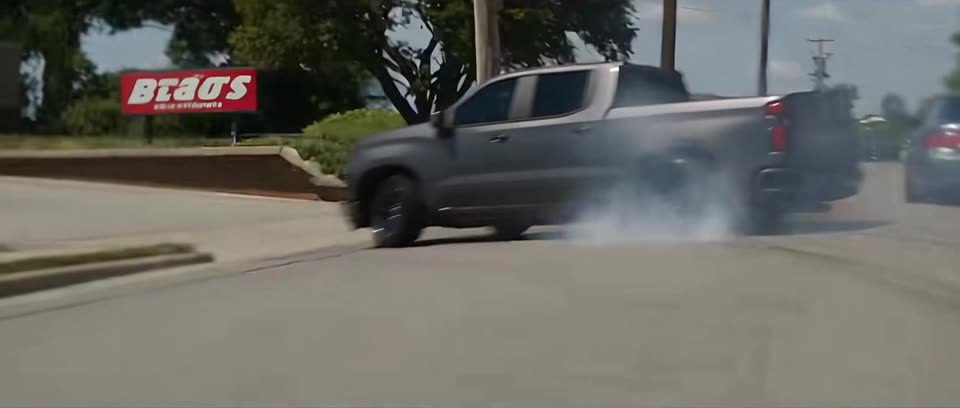
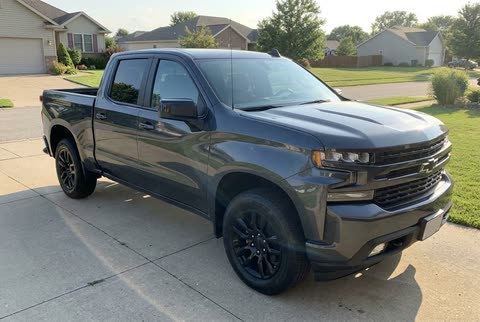 Input photo
1 purchase = 3 videos: 16:9 + 9:16 Single + 9:16 2× Split
No sign-up · One-time payment · Sound included
How to make your car chase video
Prefer doing it yourself? Read the DIY tutorial
- 01
Upload one car photo
Daylight shot from a front corner with the whole vehicle in frame. Color, wheels and body mods carry into every shot.
- 02
AI renders the chase
Seedance rebuilds every camera angle with your car in it. Usually 10 to 20 minutes; you can close the tab while it runs.
- 03
Download all 3 videos with sound
One purchase gives you 3 watermark-free 720p MP4s with viral audio: 16:9 widescreen, 9:16 single, and 9:16 2× split-screen for TikTok.
Why it costs more than a template app
Most cheap “Need for Speed” templates make a new few-second clip from your photo. This site runs a video model over every second of the real trend clip and swaps your car into each shot, which is what makes it look like the posts you've seen. That costs about $11 per 30-second video to make, so there is no $4 version of it.
| This site | Photo-to-video templates | Edit templates (CapCut, Pippit) | |
|---|---|---|---|
| What it makes | The trend clip itself, redone shot by shot with your car in it | A new short clip made from your still photo | Your own footage, cut to the trend’s beat |
| Looks like the trend | Yes: same shots, camera moves and timing | Same idea, different shots | Only if you filmed something similar |
| Length | 30 s, 14 s or an 8 s burnout | Usually 5–10 s | Whatever you film |
| Sound | Trend sound included | Varies by app | Add it yourself |
| TikTok format | 16:9 + 2 free 9:16 downloads (single & 2× stacked) | Varies by app (often extra credits) | 9:16 |
| Price per video | $7.99 (8 s) · $14.99 (14 s) · $29.99 (30 s), one-time | Often $2–5 in credits, mostly with a credit pack or subscription | Free, or an app subscription |
| Account | Not needed | Usually needed | Needed |
The one other tool we found that also copies the clip (MakeViral) charges about $30–44 in credits for the full scene. Checked on each tool's own pages, 17 November 2026; prices change. Full details in generators compared.
Will it look like my car?
That is the most common problem with this trend. General AI video apps build the whole scene from a text prompt, so they tend to swap in a generic muscle car, change the paint or lose your wheels and badges. Some templates even turn every car into the same movie car.
We do it the other way round. Your photo and the original trend clip go to Seedance 2.5 in edit mode: the town, the crowd, the camera moves and the timing stay as in the clip, and only the hero car is replaced with yours. Body shape, color, wheels and visible mods carry into every shot. One clear photo is enough.
For the closest match, use a photo with:
- The whole vehicle in frame, nothing cropped off
- Daylight, shot from a front corner (like a for-sale listing photo)
- Only your car in the picture, no other cars in front of it
- Sharp and in focus; a phone photo is fine
Quick facts
1 pay → 3 videos
16:9 + 9:16 single & 2× split
From $7.99
One-time pay, no subscription
No sign-up
Pay & render straight away
Auto-credit
Failed renders go back to balance
- What you get
- 720p widescreen (16:9) MP4 of the viral chase scene with your car in it: the full 30 seconds, the first 14 seconds (burnout and getaway), or an 8-second burnout clip. Plus two free 9:16 TikTok downloads (single centered & 2× stacked), made in your browser
- What you upload
- One JPG, PNG or WebP photo of your car, truck or bike, up to 10 MB
- How you buy
- Pick 8, 14 or 30 seconds and pay once for one video
- Account
- Not needed. Pay straight away; add an email later to keep your videos on other devices
- Price
- 8 seconds: $7.99. 14 seconds: $14.99. 30 seconds: $29.99. One-time, no subscription
- Free version
- None. Every video runs on a paid AI model
- AI model
- Seedance 2.5, guided by the trend clip shot by shot
- Failed videos
- The video is added back to your balance automatically
- Unused orders
- Full refund within 7 days of purchase if no video was made
- Wait time
- Often 10 to 20 minutes, longer when the queue is busy
- Sound
- Included. Your video comes with the trend's original sound
- Watermark
- None
- Your photo
- Used only to make your video, then deleted after 7 days
Updated 2026-11-17
What is the Need for Speed AI trend?
Need for Speed AI is a TikTok trend that took off in mid November 2026. Each post is the same cinematic car-chase clip: a car tears out of a parking lot, does burnouts in front of bystanders, drifts through traffic and escapes in a cloud of tire smoke. The twist is that the hero car is the poster's own car or truck, swapped in by AI.
The clip most often credited was posted on 11 November 2026 by @lakenyoung on TikTok with the caption “What did Ai do to my truck”. Tutorials re-shared it the next day, and the hashtags #needforspeedaitrend and #needforspeedaicar followed. Many posts call the clips “deleted scenes from Need for Speed”.
- What the AI car-chase trend isThe car-chase clip, who posted it first and how it spread.
- How to do the trend, step by stepStep by step, with this site or with a video app.
- The exact prompt for the chase clipThe exact prompt we use, and how to adapt it.
- Trend video generators comparedLength, format, model and price on each tool, with sources.
- Is it free? The cheapest optionsWhat free really costs, and the cheapest honest options.
Questions about the trend video
What is the Need for Speed AI trend?
A TikTok trend from November 2026. People post a cinematic car-chase clip, with burnouts, drifting past bystanders and a getaway, where the hero car has been swapped for their own car or truck with AI. The clip most often credited was posted on 11 November 2026 with the caption "What did Ai do to my truck", and tutorials spread it the next day. People call the clips "Need for Speed AI" or "deleted scenes from Need for Speed".
How does the AI put my car in the video?
We send your car photo and the trend clip to the Seedance 2.5 video model in edit mode. It keeps every shot, camera move and the timing of the clip and replaces the hero car with the vehicle in your photo: its body, color, wheels and mods. It is a new AI video, so small details can differ from your photo.
How long is the video, and what shape?
You choose: the full 30-second scene, the first 14 seconds (the burnout and the getaway, ending on a clean cut) for half the price, or an 8-second burnout clip, the cheapest way to try it. All are 720p, widescreen 16:9 like the original clip. For TikTok, Reels or Shorts you also get two free 9:16 downloads—single centered with black bars, or two stacked frames edge-to-edge—both made in your browser at no extra cost.
Is there a free version?
Not on this site. Each video runs on a paid model, so we sell videos one at a time instead of offering a free tier. Our guides explain the do-it-yourself route with a video app if you would rather spend time than money.
Do I need credits or a subscription?
No. You pick a length—8, 14 or 30 seconds—and pay once for that video. Nothing renews and unused balance never expires.
What photo works best?
One vehicle, the whole of it in frame, shot in daylight from a front corner, like a for-sale listing photo. Avoid photos where the car is cropped, covered, at night or behind other cars. Trucks, SUVs, sports cars and motorbikes all work.
What if the video fails or looks wrong?
If generation fails or is blocked, the video is added back to your balance automatically. If a finished video is clearly broken or you are unhappy with it, email us and we will review it. AI video can change badges, wheels or small details, and those reviews are not automatic refunds. If you haven't started a video yet, you get a full refund within 7 days of purchase.
Can I make the chase video on my iPhone or Android?
Yes. This site runs in your phone browser (Safari or Chrome), so there is no app to install. Upload a car photo from your camera roll, pay once, and download all 3 MP4s (16:9, 9:16 single and 9:16 2× split) straight to your phone, ready for TikTok, Reels or Shorts. You can lock the phone while it renders and come back later.
How long does it take to turn a car photo into the chase video?
Uploading and paying takes under a minute. The AI render itself usually takes 10 to 20 minutes, sometimes longer when the queue is busy, because the model rebuilds every shot of the clip with your car in it. You do not need to keep the page open.
Is one photo of my car enough?
Yes. One clear photo is all you upload. The trend clip supplies the camera moves, the town, the crowd and the timing; your photo supplies the vehicle. A daylight shot from a front corner with the whole car in frame gives the AI the most to work with.
Why do AI video apps change my car, and how do I keep it looking like mine?
A general video app invents the whole scene from a text prompt, so it often swaps in a generic car, changes the color or loses the wheels and badges. We run Seedance 2.5 in edit mode on the actual trend clip: the scene is fixed and only the hero car is replaced, so the model spends its effort on matching your vehicle. Use a sharp daylight photo with the whole car visible and no other cars in front.
What sound does the trend use, and how do I post it?
Every video comes with the trend's original sound already mixed in, so you can post the MP4 as it is. On TikTok, upload the 9:16 single or 9:16 2× split copy from your gallery and add #needforspeedaitrend or #needforspeedaicar. A caption like "What did AI do to my car" matches how the trend is usually posted.
Which AI tool is best for this car-chase trend?
It depends on what you want to spend. General video generators such as Kling, Runway, Hailuo or Veo can make a car chase, but you write the prompt, supply a reference and retry until the car looks right, paying credits on each try. This tool is set up for this one clip: one photo in, 8, 14 or 30 seconds out in all 3 formats with sound, priced once per video. Our comparison page lists the trend tools side by side.
Is this made by EA or connected to the Need for Speed games or film?
No. This site is an independent tool named after the TikTok trend. It is not affiliated with, endorsed by or sponsored by Electronic Arts, the Need for Speed games or film, TikTok, or the creators of the trend. Need for Speed is a trademark of Electronic Arts Inc. We use no game or film footage.
Your car's movie scene is one photo away
From $7.99 per video. No sign-up, no subscription.
Put my car in the chase